Editing
Once your shots are rendered, editing is where you turn them into a finished cut — trimming, joining clips with transitions, grading the colour, adding captions, music and sound, and putting on cinematic letterbox bars. It's a separate, lightweight layer: pure ffmpeg, so it runs without Blender and is fast.
The Edit DSL assembles rendered shots into a final cut. It is pure ffmpeg — no Blender — so
it runs under plain python3 (captions also need Pillow).
from dsl.edit_dsl import Edit

edit = Edit("bridge_sequence")

with edit.clip(shot1.render, name="setup") as c:
    c.trim(0.2, 3.5)
    c.fade_in(0.4)
    c.caption("Canal Bridge — Dusk", start=0.2, end=2.0)
    c.look("cold")

with edit.clip(shot2.render, name="move") as c:
    c.slow_motion(0.7)
    c.sound("sfx/bird_tweet", at="start")

edit.between("setup", "move").crossfade(0.5)
edit.music("bgm/atmospheric_pad", volume=0.12)
edit.letterbox("2.35")
edit.save("final.mp4")             # → edits/bridge_sequence/final.mp4
Per-clip operations
| Group | Methods |
|---|---|
| Picture | trim, cut_start, cut_end, duration, speed, slow_motion, reverse, freeze, fade_in, fade_out |
| Sound | mute, sound, music, ambience |
| Text / look | caption, overlay, look, letterbox |
| Beats | beat("reveal" / "shock" / "romantic_pause" / "memory_flash") |
Time expressions for at/start/end: a number, "start", "end", "end-0.5",
"start+0.3".
Transitions
cut · smash · crossfade(duration) · wipe(direction, duration) · fade_to_black(duration)
Parameter reference & tuning
Every editing dial, its unit and default. Time expressions (at / start / end): a number of
seconds, "start", "end", "end-0.5", "start+0.3".
Picture (per clip)
| Method | Dial(s) | Default | Effect |
|---|---|---|---|
trim(start, end) |
seconds | 0.0, end |
keep start…end |
cut_start / cut_end(s) |
seconds | — | shave N s off the head / tail |
duration(s) |
seconds | — | force a hard length |
speed(factor) |
× | — | >1 faster, <1 slower |
slow_motion(factor) |
× | 0.6 |
slow-mo shortcut |
freeze(at, duration) |
time, seconds | —, 0.5 |
hold a single frame |
fade_in / fade_out(s) |
seconds | 0.4 |
dip from / to black |
Sound (per clip / whole cut)
| Method | Dial(s) | Default | Effect |
|---|---|---|---|
sound(name, at, volume, pan) |
time · gain · −1…1 | "start" · 1.0 · 0 |
one-shot SFX; raise volume to ~1.3–1.6 over existing audio; pan L↔R |
music(name, volume) |
gain | None |
a music bed; set ~0.6–0.8 (amix halves it — #8) |
ambience(name, volume) |
gain | — | alias of music |
mute() |
— | — | drop the clip's own audio |
Text · look · transitions
| Method | Dial(s) | Default | Effect |
|---|---|---|---|
caption(content, start, end) |
text · time · time | 0.0, end |
on-screen text |
overlay(name, opacity, start, end) |
0–1 · time | None |
image/sting overlay (needs index.json) |
look(preset) |
name | — | colour grade — warm·cold·noir·dream·memory·surveillance |
letterbox(aspect) |
ratio | "2.35" |
cinematic bars |
crossfade(d) · wipe(dir, d) · fade_to_black(d) |
seconds (· direction) | 0.4 · 0.5 · 0.5 |
between-clip transitions |
beat(name, at) |
name · time | "end-0.5" |
editorial preset (needs index.json) |
Assembling these toward a finished look: see Production-Quality Tuning.
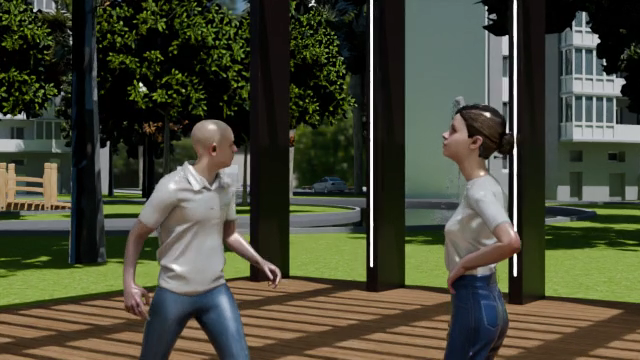
Color looks
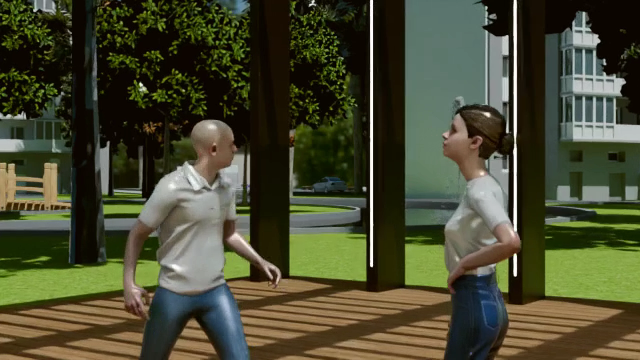
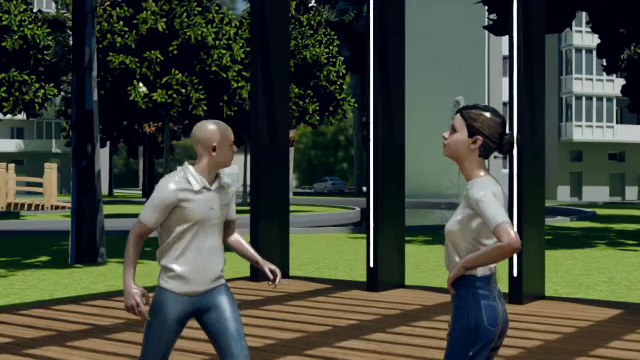
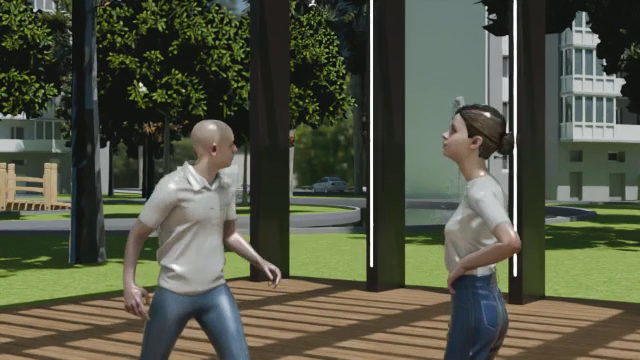
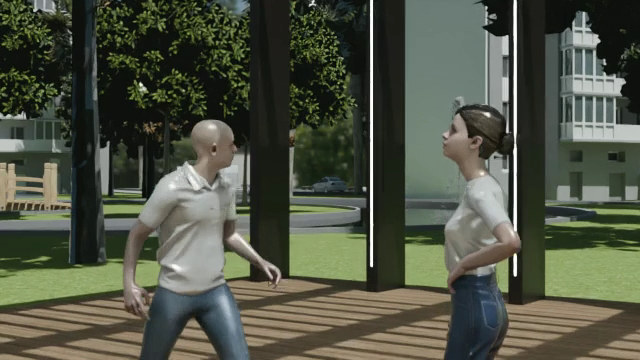
Six color-grade presets that set a mood — applied per clip with c.look("<name>") or to the whole
cut with edit.look("<name>"). Shown below on the same daylight Cycles frame so the difference
is clear:
| original | warm |
cold |
noir |
|---|---|---|---|
 |
 |
 |
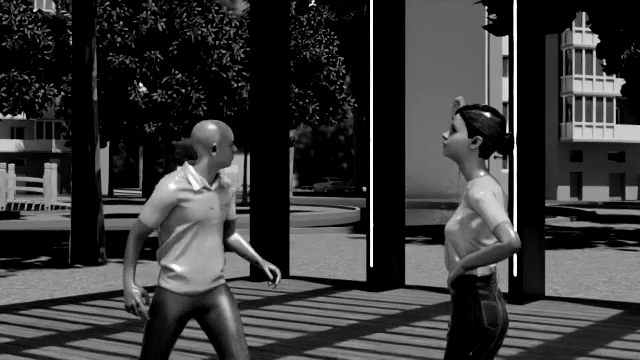 |
| ungraded | golden, +saturation | cool/blue | black & white, high contrast |
dream |
memory |
surveillance |
|---|---|---|
 |
 |
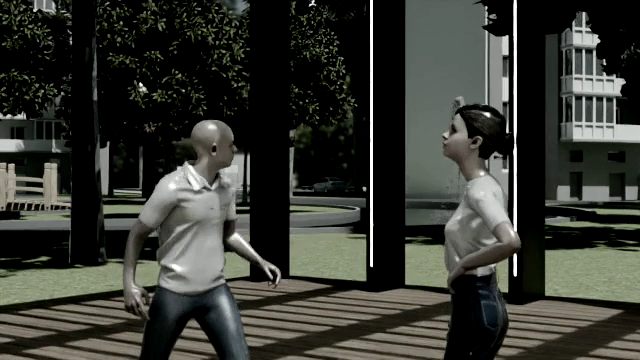 |
| soft, hazy, brightened | heavily faded / nostalgic | desaturated + contrasty (CCTV) |
with edit.clip(shot.render) as c:
    c.look("cold")          # warm · cold · noir · dream · memory · surveillance
edit.look("noir")           # …or grade the whole assembled cut
A finished cut applies a look in motion, alongside transitions, music, and letterbox (unmute for the music):
Audio assets
Namespaced keys, auto-indexed from the asset packs:
- Music:
"bgm/<name>"— 58 tracks (e.g.bgm/atmospheric_pad,bgm/classical_piano). - SFX:
"sfx/<name>"— 112 effects (e.g.sfx/bird_tweet,sfx/body_fall).
Background music (BGM)
Lay a music bed two ways:
| Scope | Call | Effect |
|---|---|---|
| Whole cut | edit.music("bgm/<name>", volume=…) |
one track under the entire assembled timeline (edit.ambience(…) is an alias) |
| One clip | c.music("bgm/<name>", volume=…) |
music under that clip only |
Under the hood (add_bgm) the track is looped to cover the video, faded in/out, and
mixed under any existing audio (dialogue, SFX).
Set the volume higher than you'd expect
The mix uses ffmpeg's amix, which scales each input by ~½ — so a value like 0.15 comes out
near-silent. Use roughly 0.6–0.8 for an audible-but-subtle bed (≈0.3–0.4 in the
final mix). The Scene 2 sample uses 0.7. Details in Known Issues #11.
The library: 58 tracks under assets/bgm/, auto-indexed as "bgm/<name>" —
e.g. bgm/atmospheric_pad, bgm/classical_piano, bgm/action_heroic, bgm/comedic_score,
bgm/city_street, bgm/cafe_ambience. List them with assets.list("audio").
Track levels vary — set volume to taste
All 58 tracks load and mix (verified). But their built-in loudness ranges widely — e.g.
action_heroic ≈ −15 dB vs atmospheric_pad ≈ −47 dB — so one volume won't suit every
track. Rough starting points: punchy tracks ~0.6–0.8; quiet ambient beds higher.
Hear it: the Gallery's Sample Scene has a with-music / no-music A/B of the exact same cut.
Sound effects (SFX)
An SFX is a one-shot sound dropped at a moment in a clip (a thud, a whoosh, a gunshot). Adding one is three steps.
1 · Find an effect. Effects are keyed "sfx/<name>" — 112 of them under assets/sfx/
(e.g. sfx/body_fall, sfx/sword_whoosh, sfx/gunshot, sfx/crowd_cheer, sfx/footsteps_grass).
Browse them:
assets.list("audio")                                  # every bgm/* and sfx/* key
assets.search("audio", kind="sfx", tags=["impact"])   # filter by tag
2 · Drop it on a clip with c.sound(...):
with edit.clip(shot.render) as c:
    c.sound("sfx/body_fall", at="end-0.5")     # plays once, near the end of this clip
3 · Place & balance it with the three knobs:
| Arg | Controls | Examples |
|---|---|---|
at |
when it fires | "start", "end", "end-0.5", "start+0.3", or seconds (1.2) |
volume |
how loud | 1.0 default — raise to ~1.3–1.6 if dialogue/music is present (it's amix-mixed) |
pan |
left ↔ right | -1.0 (left) · 0 (centre) · 1.0 (right) |
Per-clip vs. whole-cut
c.sound(...) attaches to the clip you're editing. For a timeline-wide effect, use
edit.audio("sfx/<name>", start=…, volume=…) on the assembled cut.
All effects verified
112/112 effects resolve and mix (test_check/sfx_check.py); sampled effects land at a
clearly audible −24 to −31 dB at volume=1.0. Note: like BGM, an SFX is amix-mixed under
existing audio, so over a clip that already has dialogue/music you may need to raise volume.
SFX in action — effects matched to their moment (unmute, pick a tab):
Optional assets
The stock/images overlay categories and the beat() presets reference named stock/sting
assets that only exist if you create assets/edit/index.json.