Your First Scene
Let's render a single shot from scratch and understand every line.
The script
Save this as my_scene.py in the repo root:
import sys
from pathlib import Path
sys.path.insert(0, str(Path(__file__).parent))   # make dsl/ and sets/ importable

from sets.apartment_complex import canal_bridge
from dsl.actors import brian
from dsl.rendering import use_fast_output

# Fast, low-res proxy so it renders quickly while you iterate.
use_fast_output(engine="workbench", downsample_factor=4)

hero = brian("Hero")                  # mint a named character from the 'brian' rig

with canal_bridge.Tree1.A1 as shot:   # open a shot at a named anchor in the set
    shot.add(hero)                    # place the actor at that anchor
    shot.lighting("rembrandt")        # portrait key light
    shot.camera("static", mode="medium", R=3.0, theta=15)   # frame him
    hero.idle()                       # hold a neutral pose
    shot.clip(1/24)                   # render a single frame
Run it
The result lands in renders/apartment_complex/canal_bridge/shot1.mp4:
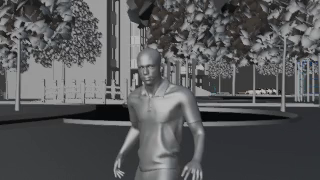
What each piece does
| Line | Meaning |
|---|---|
use_fast_output(...) |
Sets the global render profile — a fast, downsampled proxy. Switch to use_production_output() for the final. |
brian("Hero") |
A rig (brian) minted into a named character ("Hero"). The name drives object/audio naming. |
with canal_bridge.Tree1.A1 as shot: |
Opens a shot at the anchor A1 in sublocation Tree1. The anchor sets position + facing. |
shot.add(hero) |
Places the actor at the anchor. |
shot.lighting("rembrandt") |
Records a lighting preset (resolved when the block closes). |
shot.camera("static", …) |
Records the camera — mode = framing, R = distance, theta = orbit angle. |
hero.idle() |
Records an action. |
shot.clip(1/24) |
Caps the shot to one frame (1/24 s). |
The key idea: declare, then compile
Everything inside the with block only records intent. Nothing renders until the block
exits — then agentwood runs a fixed pipeline (validate → timeline → camera → lighting →
render) and tears the shot down so nothing leaks into the next one. This is the single most
important concept in the DSL; see Core Concepts → The Shot Lifecycle.
Try changing things
- Different actor:
megan("Hero"),swat("Operator"),david("Sam")… - Different framing:
mode="closeup", R=1.2ormode="wide", R=8. - Different light:
"three_point","butterfly","split", or"hdr". - Make it move: replace
hero.idle()withhero.walk_to((0, -3, 0))and useshot.camera("tracking_moving"), then drop theclip()so it runs the full walk.
Iterate fast, then finalize
Keep use_fast_output(engine="workbench") while composing (instant, but unlit). Switch to
engine="eevee" to see lighting, and use_production_output(engine="cycles") for the final.
See Features → Rendering.