Shot Modes
There are three ways to open a ShotContext. Pick based on whether you need the set and how many
actors you're placing.
| Mode | Open with | Placement | Set loaded? | Use when |
|---|---|---|---|---|
| Anchor-based | with loc.Sub.Anchor as shot: |
implicit (the anchor) | yes | one actor at a named spot |
| Location-based | with loc as shot: |
explicit at= per actor |
yes | choosing anchors / multi-actor |
| Bare scene | with bare_scene as shot: |
explicit at= (tuple ok) |
no | isolating actors/cameras/lights |
Anchor-based
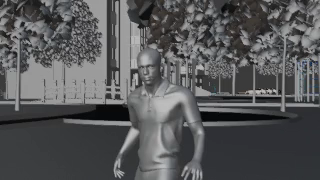
A named shot point sets position and facing automatically — no at= needed.
with canal_bridge.Tree1.A1 as shot:
    shot.add(hero)
    shot.camera("static", mode="medium", R=3.0, theta=15)
    shot.clip(1/24)
Warning
In an anchor-based shot, more than one actor requires shot.block(...) — bare placement
is ambiguous and rejected.
Location-based
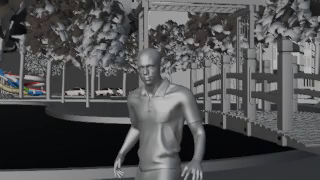
Open the whole location, then place each actor explicitly with at= (an anchor or a raw tuple).
This is the form for multi-actor staging.
with canal_bridge as shot:
    shot.add(hero, at=canal_bridge.Tree2.C1)
    shot.camera("static", mode="medium", R=3.0, theta=15)
    shot.clip(1/24)
Bare scene
No .blend at all (actor_scale = 1.0). The actor stands alone — ideal for testing a camera
move or a light without the heavy set load.
from dsl.set_metadata import bare_scene

with bare_scene as shot:
    shot.add(hero, at=(0, 0, 0))
    shot.camera("static", mode="medium", R=3.0)
    shot.clip(1/24)
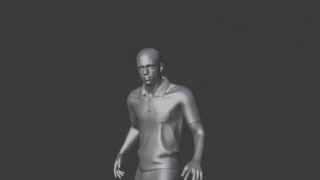
The set adds nothing here by design — grey void, actor only.