Render Pipeline
How a shot actually becomes a video, under the hood (dsl/rendering.py). One global
RenderConfig drives everything; ShotContext._render calls into the functions below on exit.
Setting the profile
There's a single module-level config (_CURRENT_RENDER_CONFIG). Set it before opening shots:
| Function | Result |
|---|---|
use_fast_output(engine, downsample_factor, animation_fps, output_fps, frame_step, cycles_samples, use_gpu) |
sets mode="fast" (sparse proxy + audio mux) |
use_production_output(engine, downsample_factor, animation_fps, cycles_samples, use_gpu) |
sets mode="production" (full render) |
use_fast_viewport_render(downsample_factor=8) |
shortcut → fast workbench |
use_fast_eevee(downsample_factor=4) |
shortcut → fast eevee |
use_fast_cycles(samples=16, use_gpu=True, downsample_factor=4) |
shortcut → fast cycles |
get_render_config() / set_render_config(cfg) |
read / replace the global config |
print_render_settings() |
dump the active config + Blender settings |
RenderConfig fields
| Field | Default | Meaning |
|---|---|---|
mode |
"fast" |
"fast" (proxy) or "production" (full render) |
engine |
"workbench" |
workbench / eevee / cycles |
animation_fps |
24 |
FPS the animation is authored/evaluated at — keep 24 |
output_fps |
1 |
(fast) playback FPS of the proxy video |
frame_step |
24 |
(fast) render every Nth animation frame |
base_resolution |
(1280, 720) |
before downsampling |
downsample_factor |
4 |
divides both dimensions (resolution property = 1280//d × 720//d) |
cycles_samples |
16 |
path-tracing samples |
eevee_samples |
16 |
eevee TAA render samples |
use_gpu |
True |
best-effort GPU for cycles |
ffmpeg_path |
"ffmpeg" |
encoder binary |
The proxy-playback rule
For the fast proxy to play at real-time speed (not freeze), keep output_fps ≈ animation_fps
/ frame_step — e.g. frame_step=3 → output_fps=8. A mismatch renders too few frames for the
duration, so it freezes on the last one. Keep downsample_factor even-dividing (1/2/4/5/8) so
the encode doesn't break (Issue #1).
Two modes, one entry point
render_shot_movie(output_path, frame_start, frame_end, audio_mixdown_path, config) dispatches:
Fast proxy (render_fast_proxy_movie)
- Export audio —
mixdown_audio()writes the sequencer audio to*_audio.wav. - Sample frames —
range(frame_start, frame_end+1, frame_step)(plus the final frame) rendered to PNGs in a temp dir. - Mux — ffmpeg encodes the PNGs at
output_fps:-framerate {output_fps} -i frames -i audio -c:v libx264 -pix_fmt yuv420p -c:a aac -af apad -t {shot_seconds}, whereshot_seconds = (frame_end-frame_start+1)/animation_fps.
Why apad + -t, not -shortest
-shortest would let a short dialog clip cut the video early. Instead the audio is padded
(apad) and the whole mux is trimmed to the true shot duration with -t.
Production (render_production_movie)
A normal bpy.ops.render.render(animation=True) at full resolution, writing H.264/AAC MP4 with the
sequencer audio included (via setup_video_output).
Engines (apply_render_engine)
Sets resolution, FPS, and engine-specific options:
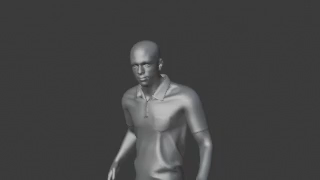
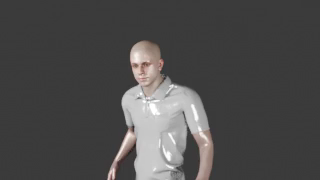
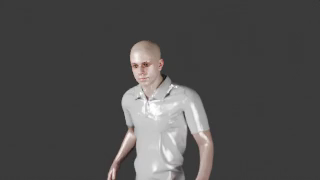
The same shot (one actor, rembrandt key) through each engine:
BLENDER_WORKBENCH — flat studio shading (color_type=MATERIAL), shadows + cavity off.
Fastest. Ignores scene lights (so lighting presets/HDR don't show).
BLENDER_EEVEE_NEXT if present, else BLENDER_EEVEE. Sets taa_render_samples = eevee_samples;
disables gtao/bloom/ssr where available. Real-time raster — respects lights/HDR.
CYCLES with samples = cycles_samples, preview_samples = min(samples, 8), denoising on,
and bounce caps for speed (max_bounces=2, diffuse 1, glossy 1, transmission 0,
transparent 2, volume 0). GPU is best-effort via _try_enable_gpu_devices
(METAL → OPTIX → CUDA → HIP → ONEAPI), falling back to CPU.
Video & audio encoding
setup_video_output(production) →media_type=VIDEO,format=MPEG4,codec=H264,audio_codec=AAC,constant_rate_factor=MEDIUM,ffmpeg_preset=GOOD.mixdown_audio→bpy.ops.sound.mixdown(container="WAV", codec="PCM", accuracy=1024), temporarily applying the shot's frame range + fps.
Output paths
Default: renders/<set>/<location>/shotN.mp4 (+ *_audio.wav in fast mode). Override per shot
with shot.output("folder/name.mp4") (relative to renders/, or an absolute path).
Function reference
| Function | Role |
|---|---|
render_shot_movie |
entry point — dispatches fast/production |
render_fast_proxy_movie |
sparse PNG render + ffmpeg mux |
render_production_movie |
full bpy.ops.render.render(animation=True) |
apply_render_engine |
configure workbench/eevee/cycles + resolution + fps |
setup_video_output |
Blender ffmpeg container/codec settings |
mixdown_audio |
export sequencer audio to WAV |
use_fast_output / use_production_output (+ shortcuts) |
set the global profile |
get_render_config / set_render_config / print_render_settings |
access/inspect the config |